Cleaner Toolbox
- 4.3
- Rating
- 10.00M
- Installs
- Free
- Price

 Analysis by App-foxy
I spent time with Cleaner Toolbox as a practical phone-maintenance app rather than treating it like a magic speed booster. Developed by SELBY TEAM, it sits in the tools category and focuses on helping you tidy up a crowded Android phone. The app is free, carries an Everyone age rating, and is available for devices running Android 6.0 or later. That makes it easy to consider if your storage is getting tight and you want one place to inspect common cleanup tasks.
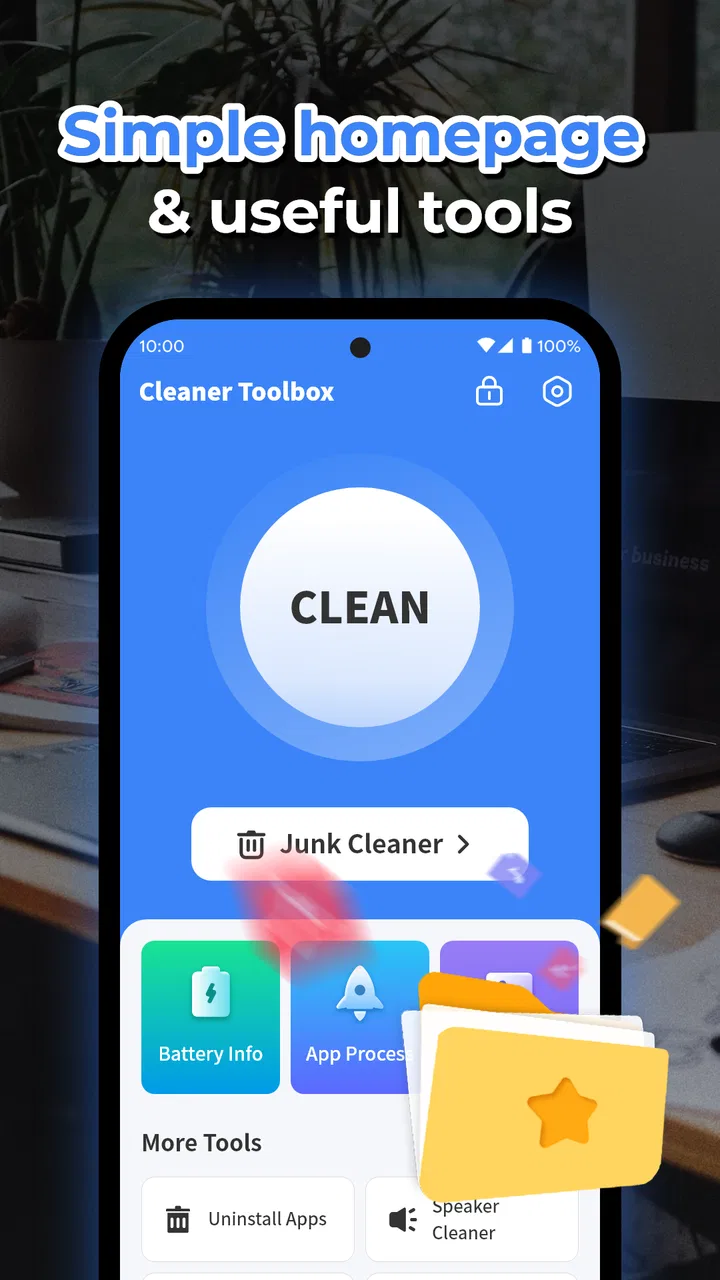
My first impression was that Cleaner Toolbox is aimed at people who want a straightforward toolbox instead of a complicated system utility. Its store summary calls it a Phone Cleaner Assistant, while the shorter description presents it as a Cleaner Toolbox. Those labels fit the role: this is less about changing how Android works and more about giving you a guided way to look for clutter and decide what deserves attention.
What you get without paying
The most important value point is simple: the app is free to use. I can recommend trying it without asking you to commit money first, which matters for a utility that may only become useful when your phone starts running low on space. The free price also changes how I judge it. I do not expect it to replace every built-in Android setting or a specialized file manager, but I do expect the basic cleanup experience to be clear enough to justify keeping it installed.
You May Also Like

 Blood Strike: 2.5 Anniversary
Blood Strike’s Loadouts Turn Every Drop Into a Tactical Gamble
A close look at Blood Strike’s custom loadouts: how fast access to signature weapons reshapes its battle royale rhythm, rewards preparation, and narrows the gap between fights.

 Pandora - Music & Podcasts
Pandora’s Music Is Easy to Start, but Harder to Recover
Pandora’s strength is its low-effort path from a seed to a station. Its weak spot is how much confidence it asks you to place in connection, setup, and quiet recovery.

 8 Ball Pool
 Is Built on Rivalries, Rematches, and Routine
A close look at the rivalries, rematches, shared routines, and unanswered safety questions that turn a quick pool match into a persistent mobile community.

 Samsung Music
’s Quiet Strength Is Playing What You Already Own
Its reach comes less from spectacle than from dependable access to a personal library. That simplicity is both the app’s strongest retention engine and its ceiling.

 AccuWeather: Weather Radar
AccuWeather Review: A Quick, Clear Forecast for Everyday Decisions
For everyday plans, the best forecast is the one you can understand quickly. AccuWeather makes rain timing, radar, and local conditions easy to act on, with a few trade-offs.

 Hill Climb Racing
Why Hill Climb Racing Still Turns Crashes Into One More Run
A tiny car, a bumpy hill and one more upgrade: Hill Climb Racing keeps resurfacing because its simple chaos makes every near-miss feel personal.
More From Our News Desk



Its public reception is also fairly strong, with a 4.4 average from around 82 thousand ratings and roughly 7 thousand written reviews. More than 10 million installations give it a broad user base. Those figures do not prove that it will identify every unwanted file on your particular phone, but they do suggest that the app has found a useful place among people looking for a simple cleaning assistant.
The current version is 1.1.5, and the app was released on June 5, 2024. I would still treat any cleaner as something to review periodically rather than leave operating on autopilot. Storage decisions can be personal: a large video, downloaded document, or old image may look unnecessary to an automated tool while still mattering to you.
That is why I prefer using Cleaner Toolbox as a decision aid. I would open it, inspect what it identifies, and then remove items deliberately. The free access is valuable when it saves you from hunting through several Android menus, but it should not encourage you to approve every suggested cleanup without checking.
Where the practical value appears
The strongest use case is the phone that feels untidy rather than seriously broken. Maybe you have collected temporary leftovers, forgotten downloads, duplicate-looking images, or applications you no longer use. A toolbox can make that first inspection less intimidating than browsing folders one by one. For a family member who is uncomfortable with file-management screens, a single cleaning-oriented app may be easier to understand.
I also see value in using it before a trip or a major event. If you are about to record a lot of photos, download maps, or save entertainment for offline use, checking available space in advance is smarter than discovering the problem when the camera refuses to save another file. Cleaner Toolbox can serve as a preparation step: inspect the phone, remove only what you recognize, and leave enough room for the files you actually plan to create.
A less obvious workflow is to use it after moving important media elsewhere. Once you have copied photos or videos to a computer or another trusted location, a cleanup assistant can help you revisit the phone and find the remaining clutter. I would not delete immediately after a transfer, though. I would first open a few files from the destination and confirm that the copies are usable. The trade-off is a little extra caution in exchange for avoiding an irreversible mistake.
Another useful habit is separating “I do not need this today” from “I will never need this.” Cleaner Toolbox is more helpful when you use it for the second category. Old screenshots, abandoned downloads, and leftover installation files are easier decisions than personal photos or work documents. I would make a small pass first, then return later once I know the phone still behaves normally.
For someone managing an older Android device, the minimum operating-system requirement of Android 6.0 or later is relevant. It covers a wide range of phones, although the experience can still vary with the device manufacturer and Android interface. A tool that feels convenient on one phone may overlap with built-in storage controls on another, so I would compare both before deciding which one deserves regular use.
How I would use it in an everyday situation
Imagine that your phone warns you about low storage on a busy morning. I would not begin by deleting random files. I would open Cleaner Toolbox, look for the categories it presents, and start with items whose purpose is obvious. Temporary clutter is a better first target than a folder of unnamed images. I would then check the phone’s gallery, downloads area, and messaging attachments separately, because those personal files often matter more than the technical leftovers.
After the first pass, I would close the cleaner and test the things I rely on: the camera, messaging, and the applications I need that day. If everything works as expected, I would consider a second pass for less urgent material. This two-stage approach is one of the best ways to get value from a free cleaner without handing over all judgment to it.
There is also a useful distinction between storage and performance. Removing unwanted files can make room, but it does not automatically transform an older phone into a new one. If an app is slow because of a weak processor, a poor network connection, battery wear, or a demanding operating-system update, a cleanup tool may not solve the real problem. I appreciate Cleaner Toolbox more when it is used for organization and space management than when it is treated as a guaranteed speed cure.
Where the trade-offs matter
The main friction with any phone cleaner is trust. The app is asking you to review material that may include personal images, documents, or downloads. Even when a suggestion looks sensible, I want to know exactly what will be removed before confirming. My advice is to treat broad cleanup buttons cautiously and prefer item-by-item review whenever the app gives you that choice.
There is another trade-off between convenience and precision. A dedicated cleaner can surface common clutter faster than manual browsing, but Android’s own storage tools may show more context because they are part of the operating system. A file manager may be better when you need to rename, move, archive, or inspect folders. Cleaner Toolbox makes more sense when your immediate goal is a guided tidy-up, not detailed file administration.
I would also avoid assuming that every item labeled as unnecessary is genuinely useless. Cached material can sometimes be recreated, but downloaded content and user-created files deserve a closer look. If you share a phone with work responsibilities, keep offline documents, or use applications that store important media locally, a rushed cleanup can create more inconvenience than it removes.
Free access is a genuine advantage, but it also means the app should earn its place through convenience. If your phone already has a clear built-in storage manager that identifies the same material, installing another tool may add an extra layer rather than solve a problem. In that situation, the best option may be the system utility you already have, especially if you prefer minimizing the number of apps that can inspect your files.
I would skip Cleaner Toolbox if what you really want is advanced file control, detailed storage analytics, backup management, or a complete privacy audit. Those jobs call for more specialized tools. I would also skip it if your phone has plenty of free space and you rarely download or create large files. A cleaner is most useful when it removes a real source of friction, not when it becomes another app to check out of habit.
Who is likely to get the most from it
I think Cleaner Toolbox suits Android users who want a low-cost starting point for cleaning up a congested device. It is particularly approachable for people who do not enjoy navigating storage folders, and the Everyone rating makes it a reasonable option for a broad household audience. The Android 6.0 minimum also means owners of older compatible phones can consider it instead of assuming they need a recent device.
It can be useful for students who accumulate screenshots and downloads, travelers preparing space for offline media, and anyone whose messaging applications have gradually filled the phone with attachments. In each case, the value comes from creating a repeatable inspection routine. I would use it before a storage emergency, perhaps after a large project or trip, rather than waiting until the camera or downloads stop working.
Power users may feel differently. If you already understand Android storage categories and keep a careful folder system, the app may not add much. You might prefer a file manager that shows exact paths and gives you more control. Likewise, people who expect one tap to fix every performance issue may be disappointed because storage cleanup and device speed are related only in certain situations.
The best way to decide is to compare the app with the tools already on your phone. Check whether the built-in storage screen offers the same visibility and whether it lets you remove the same kinds of clutter. If Cleaner Toolbox presents the information in a way you understand more quickly, that convenience can be worthwhile even when the underlying cleanup tasks overlap.
Small checks that make cleanup safer
If a scan seems to take longer than expected or does not free as much room as you hoped, I would resist repeating it immediately. First, close other open tasks and check Android’s own storage screen to see whether space actually changed. Some files that appear temporary may return as apps rebuild them, while large personal downloads remain until you remove them yourself. Understanding that difference helps avoid treating a modest result as a failure.
Before a cleanup, I would also make sure important photos and documents are backed up somewhere I can open them. If a suggested item has an unclear name, leave it alone and inspect it through the relevant app or file manager instead. A cautious review is especially worthwhile when the phone is shared: another person’s download may look expendable from your account but be important to them.
When the phone problem has another cause
When storage is not the bottleneck, a cleaner is unlikely to fix the symptoms. If pages load slowly only on mobile data, test the connection; if one app freezes, check that app directly; if the phone overheats or loses charge quickly, deleting files may not address the cause. I would use Cleaner Toolbox to investigate space, then switch to the relevant Android settings or app support when the problem points elsewhere. That keeps cleanup from becoming a frustrating ritual with no connection to the actual issue.
My final recommendation
After reviewing it as a practical utility, I see Cleaner Toolbox as a useful free assistant for people who want a simpler path into phone cleanup. Its large installation base and 4.4 average make it easy to take seriously, while the free price keeps the decision low-risk. I would recommend trying it when storage organization is a real problem, especially on an older compatible Android phone or one that has accumulated months of downloads and media.
My recommendation comes with one firm condition: stay involved in the deletion process. Use the app to locate likely clutter, but inspect anything personal before removing it. Start with obvious leftovers, confirm that important files are safe, and test the phone afterward. That approach gives you the convenience of a cleaner without surrendering control of your data.
For a person who wants advanced file management or a guaranteed performance boost, I would choose a different kind of tool, or simply use Android’s own storage controls. For everyone else, Cleaner Toolbox offers a sensible first step because it is free, accessible, and focused on a common everyday problem. Its real strength is guided cleanup, not miracle repair; used with that expectation, it can earn a place on a crowded phone.
FAQs for Cleaner Toolbox
01What is Cleaner Toolbox and how does it work?
Cleaner Toolbox is a comprehensive utility app designed to optimize and maintain your smartphone's performance. It works by clearing cached files, managing storage, and optimizing RAM usage, which can help improve your device’s speed and battery life. With a user-friendly interface, it provides insights into storage usage and offers tools to manage your files efficiently.
02Is Cleaner Toolbox safe to use on my device?
Yes, Cleaner Toolbox is safe to use. It has been thoroughly tested for security and privacy, ensuring that it doesn’t access or share your personal data without permission. The app is regularly updated to protect against vulnerabilities and is available on official app stores, which have their own security checks.
03Do I need a subscription to use all features of Cleaner Toolbox?
Cleaner Toolbox offers both free and premium versions. The free version provides basic cleaning and optimization features, while the premium version unlocks advanced tools such as deep cleaning, automated scheduling, and ad-free experience. A subscription might be required for these advanced features, offering more comprehensive device management.
04How does Cleaner Toolbox help in improving my device’s battery life?
Cleaner Toolbox improves battery life by identifying and closing apps running in the background that are draining resources unnecessarily. It also helps manage startup programs and optimizes battery usage based on your device's specific needs, ensuring that your phone runs more efficiently and conserves power.
05Can Cleaner Toolbox recover deleted files?
Cleaner Toolbox primarily focuses on optimization and maintenance rather than file recovery. However, it offers some basic tools for retrieving recently deleted files, depending on how the data was stored. For comprehensive recovery, specialized data recovery apps might be more suitable, as Cleaner Toolbox is not specifically designed for this purpose.
Pros
- Intuitive user interface for easy navigation.
- Efficiently frees up storage space.
- Boosts device performance noticeably.
- Offers detailed storage analysis.
- Includes a secure file shredder feature.
Cons
- Contains ads that can be intrusive.
- Some features require in-app purchases.
- Occasional notifications can be disruptive.
- Limited functionality on older devices.
- May drain battery faster during use.

Cleaner Toolbox
Gallery